3D printing hobbyists
A downloaded model opens in a slicer with missing faces, holes, or non-manifold edges.
STL repair helps identify and close structural gaps before the print is prepared.
how to fix an STLMesh repair explained
What is STL repair software? It is a tool that analyzes an STL mesh, identifies problems that can prevent slicing or printing, and applies corrective changes to make the model more usable. STL repair is about mesh structure, not redesigning the object.
Related guidance
These related guides explain where STL repair fits in an online workflow, how repair tools differ, and what to expect from repaired model examples.
People and workflows
STL repair software is useful anywhere a digital mesh must become a dependable printable file, from first-time makers to production teams.
A downloaded model opens in a slicer with missing faces, holes, or non-manifold edges.
STL repair helps identify and close structural gaps before the print is prepared.
how to fix an STLA design export contains overlapping surfaces or inconsistent normals after conversion.
A repair workflow can clean the mesh without requiring a complete redesign in CAD.
STL repair toolA model needs a quick structural check from a browser-based workspace before production.
STL repair online can provide a convenient review step when local software is not available.
STL repair onlineCustomer files arrive with separate shells, internal faces, or holes that could affect slicing.
STL repair makes intake more consistent by revealing common mesh defects early.
STL repair examplesRepair workflow
Most STL repair workflows follow a simple sequence: inspect the mesh, apply targeted corrections, then verify that the result is suitable for the next stage.
The software examines triangles, edges, normals, shells, and other relationships to locate defects such as holes, duplicate faces, or non-manifold geometry.
Repair operations may close openings, remove redundant geometry, reconnect surfaces, or recalculate normals while preserving the model’s overall shape.
The repaired STL is checked again so you can confirm that the mesh is closed, coherent, and ready for slicing, export, or further inspection.
Core checks
The exact checks vary by product, but the central purpose is consistent: find mesh conditions that can make an STL unreliable for downstream use.
Visible result
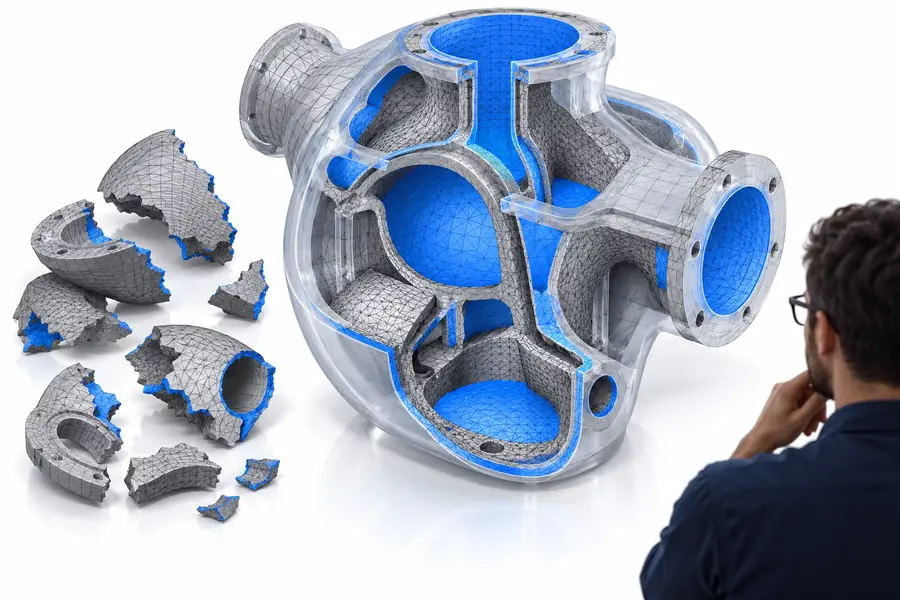
A repair changes the mesh structure rather than the intended object. The comparison below represents the difference between a defective surface and a corrected one.
Repair aims to restore usable geometry without changing the design intent.

Capability boundary
STL repair focuses on structural integrity. Manual mesh or CAD editing is still needed when the object itself must be redesigned, resized, or materially changed.
STL repair software
Manual mesh or CAD editing
STL repair software
Detect and correct common mesh defects
Manual mesh or CAD editing
Change the model’s shape or design
STL repair software
An exported STL mesh
Manual mesh or CAD editing
A mesh, CAD model, or editable design file
STL repair software
Often identifies and closes repairable openings
Manual mesh or CAD editing
Can close openings with deliberate artistic or engineering control
STL repair software
Can flag or correct many structural conflicts
Manual mesh or CAD editing
Can be rebuilt manually when automated correction is unsuitable
STL repair software
Usually preserves the existing intended dimensions
Manual mesh or CAD editing
Can intentionally resize or remodel the object
STL repair software
Not intended to add or redesign features
Manual mesh or CAD editing
Suitable for adding, removing, or reshaping features
STL repair software
Checks whether the mesh is structurally coherent
Manual mesh or CAD editing
Requires the editor to validate design intent and tolerances
Know the limits
STL repair is useful, but it is not a universal substitute for modeling, engineering review, or a complete print-preparation workflow.
When a model has a large missing section, software may not know the exact surface or feature that belongs there.
WorkaroundRebuild the missing area in CAD or a mesh editor, then use STL repair for final structural checks.
A clean mesh does not account for material behavior, supports, orientation, wall thickness, or machine settings.
WorkaroundInspect the repaired STL in a slicer and review print-specific settings separately.
Repair software can preserve or restore geometry without proving that every measurement meets an engineering requirement.
WorkaroundUse calipers, CAD inspection, or a dedicated measurement workflow for critical parts.
Aggressive correction can alter thin walls, small details, internal cavities, or separate shells.
WorkaroundKeep an original copy, review the result visually, and choose manual editing when the correction affects design intent.
Next step
Now that you know what STL repair software does, you can use it as a focused checkpoint between exporting a model and preparing it for production. Review the mesh, correct structural issues, and verify the result before relying on the file.
Open STL repairCommon questions
These answers cover the basic purpose, workflow, and limits of STL repair software.
STL repair software is used to find and correct structural problems in a triangle mesh. It can help address holes, disconnected surfaces, duplicate faces, reversed normals, and other issues that may interfere with slicing or printing.
It analyzes the relationships between vertices, edges, and faces, then applies repair operations such as closing openings, removing redundant geometry, reconnecting surfaces, or recalculating normals. The exact corrections depend on the defect and the software’s capabilities.
Its goal is usually to preserve the intended object while restoring a coherent mesh. However, automated repairs can affect thin walls, small details, or ambiguous surfaces, so important models should be reviewed after correction.
No. STL repair software focuses on making an existing mesh structurally usable, while CAD software is designed to create and edit precise parametric geometry. A repaired STL may still need CAD or mesh editing if the design itself must change.
No. A structurally repaired STL can still fail because of wall thickness, orientation, support strategy, material behavior, slicer settings, or machine conditions. Treat STL repair as one validation step rather than a complete print guarantee.